
The order starts at the counter, not in the ERP.

In short. Counter and order desk work is hard even with a modern ERP because the ERP is built for the standard transaction, and the counter lives in the variations. What fixes it is not more training on the ERP screens but a workspace designed from the real sequence of the job:
- Keep simple things simple, whatever variation the task takes that day.
- Deliver information without blocking the action.
- Put the answers staff hunt for, like network-wide inventory, one click away.
- Design it on the floor, next to the people taking orders, not in a workshop.
If you run branches or counter sales at a distributor, the counter is where your revenue happens live: a customer in front of you, a truck outside, and a competitor down the road. The ERP went live. The counter did not get faster. The line still builds on a Saturday morning, new hires still take months to become autonomous, and the same senior people still get called over the moment something is slightly unusual.
A contractor walks up to the counter. He doesn't have a product code. He has a job to finish, a truck outside, and a way of naming things that exists nowhere in the catalog. He wants to know if you have it, how much, and whether he can leave with it today.
Everything that happens in the next ninety seconds, the order, the availability check, the substitution, the price, is what we mean by operations. And almost none of it happens the way a system diagram says it does.

What actually breaks at the counter
In enterprise systems, the standard path is almost always well covered. What breaks is the variation, and at a counter, variation is not the exception.
Here's the kind of thing we watched happen. A perfectly ordinary transaction, the sort a store completes hundreds of times a day, would become impossible to finish because one small thing changed: the payment method. Nothing exotic. Nothing anyone would think to write in a specification. Just a normal customer doing a normal thing slightly differently than the standard case assumed.
That's the pattern, and once you've seen it you see it everywhere: the system handles the version of the job that was designed, and the floor lives in every other version.

So one of our first working rules came directly out of that: keep simple things simple. If a task is simple in real life, it has to stay simple on screen, no matter which variation it happens to take that day.
The information nobody reads
The second thing we saw is more subtle, and it's the one that changed how we design.
The system was pushing contextual information at store staff, memos it forced onto the screen. In theory, useful. In practice, nobody read them. Salespeople had learned to dismiss them on reflex, and they were frustrated at having to fight their own tools to keep serving the person in front of them.
Here's the part that matters, and it's why you have to be there to understand it: the information wasn't wrong, and the administrative team had good reasons to want it seen. Both sides were right. The problem was never the content, it was that the content was delivered in a way that blocked the work.
So we designed for both sides at once, and found interface patterns that let information reach the person without interrupting the action. Administration gets its message through. Sales keeps moving.

The result was measurable in the simplest way possible: store staff got faster.
How we deployed: one day a week on the store floor
Instead of running requirements workshops, the Frontleap team worked shifts at Canac's counters for months before and during deployment.
We could have booked a room and gathered stakeholders. Instead, one day a week for months, our team worked the floor, standing next to the people taking orders.
Not a site visit. Not a workshop. A recurring shift: watching the actual sequence, asking the obvious questions, being corrected.
You learn things in that position that you cannot learn any other way. You see where someone hesitates. You see the workaround they've built and stopped noticing. You see which screen they dismiss without reading, and why they're right to. You see what the senior rep knows that no new hire can find on a screen.
We saw it, so we built it
The clearest example of what floor time produces is the inventory view.
We watched how store teams updated stock levels and tried to get a total inventory picture across the network. It was extremely complex, complex enough that, at first, we didn't fully understand it ourselves. That was the signal. When a task is that hard to explain to an outsider, it's usually costing far more than anyone realizes.
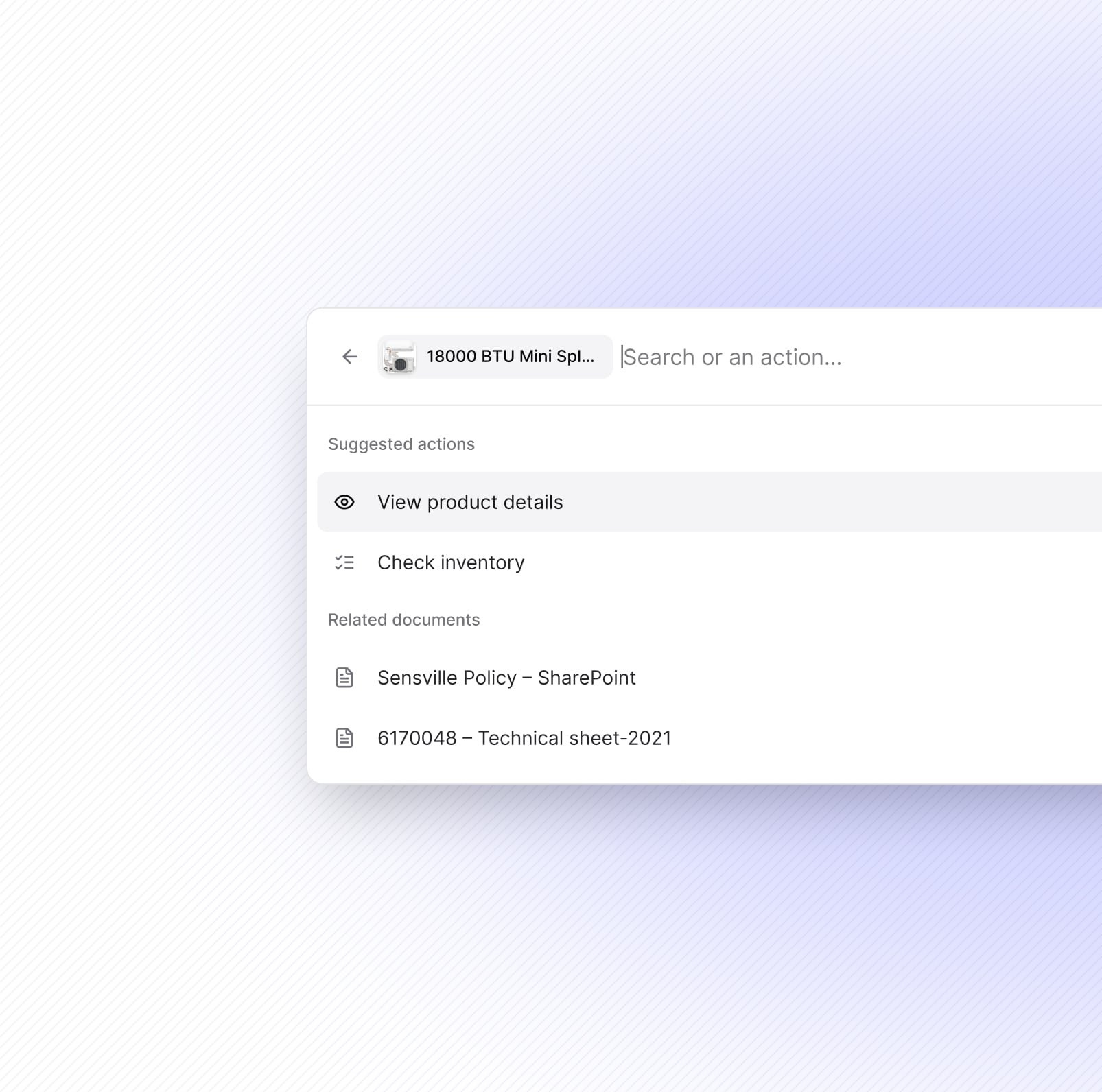
So we built the opposite of what we saw: plant inventory and network-wide inventory brought together in a single click.
It's now one of the features our users mention most.

Spend one morning at your own counter
You don't need a project, a consultant or a requirements workshop to see where your counter loses sales. Stand next to your people for one busy morning, and for every sale that doesn't go straight through, note five things:
Counter checklist · one busy morning · for every sale that doesn’t go straight through. Date: ________ Store: ________
- ☐ Where it slowed down: availability, product match, price, payment, pickup.
- ☐ What was missing: the information the person needed and couldn't see.
- ☐ Who they turned to: a senior colleague, a manager, another branch.
- ☐ What the customer did: waited, left, came back later.
- ☐ How the sale resumed: on screen, on the phone, on paper.
After a few mornings, the pattern is obvious: a handful of variations cause most of the waiting. That list is worth more than any specification, because it comes from the floor.

What we built: an operational workspace that matches the work
A Frontleap workspace follows the real sequence of a job rather than the structure of the underlying ERP.
None of this is a new system to learn. It's an operational workspace shaped by the real flow of a real counter: simple things stay simple, information arrives without blocking the action, and the answer to "do we have it?" is one click away instead of a small research project.
SAP stays exactly where it should be, the system of record. The workspace is where the work gets done.
The difference isn't that the software is prettier. It's that it was designed on real days, with real customers waiting. That's not something you can specify. You have to go see it.
How this changes the customer experience
A customer never cares which ERP you run. They care whether the person in front of them can answer with confidence, complete the order without a detour, and do it without disappearing into a back office.
That's the whole chain: a workspace built from the real work → an employee who can act → a customer who gets served properly. We judge everything we build on that last link.
How Frontleap deploys: engineers inside your operations
Frontleap uses a forward-deployed model: engineers work inside the customer's operations through rollout, rather than delivering software and handing it off.
Working the floor wasn't how we started, it's how we work. Our engineers deploy inside your operations, alongside your teams, and stay through the rollout. Not to hand over software and leave, but to make sure what we built actually changes the day.
That's also why adoption isn't something we hope for after go-live. It's what we're building from the first shift.
The ERP records the work. We make sure it gets done. (Why we build this way.)
Frequently asked questions
Why do counter staff ignore the memos and pop-ups in the ERP?
Usually not because the information is wrong, but because it is delivered in a way that blocks the sale in progress. Staff learn to dismiss it to keep serving the customer. The fix is to deliver the same information without interrupting the action, so both administration and sales get what they need.
What is the difference between training staff on the ERP and making them autonomous?
Training teaches the screens. Autonomy comes from having the answer at the moment of the sale: which product the customer means, which branch has it, what to do when the standard path doesn't fit. A workspace that follows the real sequence of the counter, and shows those answers in the flow, lets new hires serve the customer without calling a senior colleague.
Can you improve counter work without customizing SAP?
Yes. The specific way your counter works can live in a layer above the ERP instead of inside it. SAP stays the system of record, and the workspace carries the sequence, the context and the shortcuts your people need (why that matters before a migration).
See the Order Desk at the counter
Book a walkthrough with our team: a real counter sale, from the customer's words to a completed order, with the variations your people handle every day.
Book a walkthroughAuthors

Read more


Frequently asked questions
What is Frontleap, exactly?
Frontleap is an AI-powered order management platform built for manufacturers and distributors on SAP. It adds an execution layer on top of the ERP to simplify and automate order work. Your ERP stays the system of record; Frontleap is where the work actually happens — order entry, product search, inventory lookup, document access — in an interface built for the people doing it. Nothing is duplicated and nothing is replaced: we hold the last 20% of the ERP, the part your teams currently handle with spreadsheets, email and workarounds.
Do we need to replace or modify our ERP to use Frontleap?
No. Frontleap runs alongside your existing ERP, without modification to your core systems. Your ERP keeps operating exactly as before, and your IT team keeps full control of its configuration and security. We don't rip and replace anything — we sit on top and send clean, validated transactions back into the system of record.
How long does implementation take and what's involved?
Most deployments run one to three months, in three steps: connecting to your existing systems, configuring the workflows your business actually uses, then a pilot with one team before wider rollout. We deploy progressively — one location or department first, expanding once it's proven. No disruption to daily operations.
Is Frontleap secure and compliant?
Yes. Single sign-on with your existing identity provider, role-based access controls, encrypted transmission. We don't store your sensitive business data — we read it in real time from your secured systems. Everything stays inside your existing security perimeter and compliance frameworks.
What can Frontleap handle?
Order entry and modifications, product search and inventory lookup, quote generation, returns and credits, customer account management, access to specs and pricing documents, multi-location stock visibility. In practice: anything where someone has to jump between screens or systems to get one job done.
Why not just improve our current ERP?
Because the problem isn't your ERP — it's the distance between it and the people using it. ERP projects deliver the system of record; they rarely deliver adoption at the counter. Frontleap runs independently of your ERP version, so it doesn't break with upgrades, and your teams are productive in a fraction of the usual ramp-up.
Does Frontleap work on mobile and in-store devices?
Yes, any device with a browser. Desktop, tablet, phone. The interface adapts to the screen, and works with the hardware already on your floor, like scanners and receipt printers. Your teams can look up stock, build orders and process transactions from anywhere in the building.
What is AI-assisted order entry for SAP?
AI-assisted order entry uses AI to interpret an incoming customer request, map it to the products and information stored in SAP, identify missing or uncertain information, and prepare the sales order before a representative approves it. With Frontleap, the AI works alongside the existing ERP rather than replacing it. SAP remains the system of record, while Frontleap handles the operational work required to turn an unstructured customer request into a clean, validated transaction.
How does Frontleap turn an email or PDF into an SAP order?
Frontleap reads the customer request from an email, PDF or information captured during a call and identifies the products, quantities and other order details it can determine. It then resolves those details against your catalogue and relevant ERP context, including stock, pricing, customer information and previous orders. Instead of guessing when information is unclear or missing, Frontleap surfaces the exception to the representative. The rep reviews the prepared order and approves the clean transaction before it reaches SAP.
Can Frontleap understand customer product names that do not match SAP material numbers?
Yes. Frontleap is designed for the gap between how customers describe products and how those products are represented in the ERP. A customer may use an abbreviation, an old part number, a local nickname or a description such as “the usual 12 inch.” Frontleap uses catalogue information and operational context to resolve that language to the appropriate product. When there is not enough information to make a reliable match, it asks the representative rather than silently selecting a material.
What does Frontleap validate before an order reaches SAP?
Frontleap can use the information surrounding the transaction — including catalogue data, inventory, pricing, customer account information, previous orders and business context — to prepare the order before it reaches SAP. The objective is not simply to extract fields from a document. It is to determine whether the order is ready to process and identify what still requires a human decision. Missing information, uncertain matches, pricing questions and other exceptions remain visible to the representative for review.
Does Frontleap create SAP orders automatically, or does a representative approve them?
Frontleap is designed around human approval where a business decision is required. The AI prepares the order, resolves what it can from your systems and operational knowledge, and isolates the exceptions that genuinely need attention. The representative can then review, correct and approve the result before the validated transaction is sent to SAP. This allows teams to automate repetitive order preparation without asking an AI system to make business decisions that should remain with the people operating the desk.
Does Frontleap replace SAP or require changes to our ERP?
No. Frontleap runs alongside SAP rather than replacing it. SAP remains the system of record for the transaction, while Frontleap provides an execution layer where frontline teams can prepare orders and make operational decisions. This separation means the order desk can get a simpler, task-oriented workspace without turning the initiative into another ERP replacement project. Frontleap connects to the existing enterprise environment and sends validated transactions back to the system of record.
How long does it take to implement Frontleap Order Desk?
A typical Frontleap deployment runs approximately one to three months. The process starts by connecting the relevant enterprise systems and modelling the workflows, terminology and rules used by the order desk. Frontleap can then be introduced with one team, location or workflow before expanding more broadly. The objective is to prove the workflow against the customer’s own operating baseline rather than require a large transformation program before the order desk can start using the product.
Does clean core mean removing every customization?
No. It means keeping the ERP standard and moving business-specific logic out of the core. Some specific belongs in the system of record. Much of it, like product equivalences, customer habits and pricing exceptions, can live in a layer above it, where it changes without touching SAP.
What happens to spreadsheets and workarounds during an S/4HANA migration?
Custom screens and fields are scoped and priced. Spreadsheets and detours around controls are usually not counted at all, so the knowledge they carry is neither migrated nor replaced. Inventory them before the scope is frozen.
How can you keep business-specific logic without customizing SAP?
Put it in a layer that runs alongside the ERP. The ERP stays the system of record. The layer carries the rules, context and exceptions of the work, and survives upgrades because it was never inside the core.
Why do counter staff ignore the memos and pop-ups in the ERP?
Usually not because the information is wrong, but because it is delivered in a way that blocks the sale in progress. Staff learn to dismiss it to keep serving the customer. The fix is to deliver the same information without interrupting the action, so both administration and sales get what they need.
What is the difference between training staff on the ERP and making them autonomous?
Training teaches the screens. Autonomy comes from having the answer at the moment of the sale: which product the customer means, which branch has it, what to do when the standard path doesn't fit. A workspace that follows the real sequence of the counter, and shows those answers in the flow, lets new hires serve the customer without calling a senior colleague.
Can you improve counter work without customizing SAP?
Yes. The specific way your counter works can live in a layer above the ERP instead of inside it. SAP stays the system of record, and the workspace carries the sequence, the context and the shortcuts your people need (why that matters before a migration).
How do you reduce the order desk’s dependence on a few senior people?
Capture what they know while the work happens, not in a manual. Follow them through one real workflow and note every time they leave the system. Record each rule they apply with its source, scope and owner. The knowledge then stays with the business when people move on, and new hires can draw on it from day one.
How do you keep order knowledge current when catalogues, prices and teams change?
Give every rule an owner. When someone corrects an order, the owner decides whether the correction becomes shared knowledge, where it applies, and which old instruction it retires. A correction on one order should never silently change every future order.
What should an AI agent handle alone, and what should stay with a person?
An agent can act where an approved rule fully determines the next step. Judgment, negotiation and commitments beyond its authority go to the right person, with the context attached. Write down what proceeds, what pauses and what allows the work to resume before anything is delegated.
Does clean core mean removing every customization?
No. It means keeping the ERP standard and moving business-specific logic out of the core. Some specific belongs in the system of record. Much of it, like product equivalences, customer habits and pricing exceptions, can live in a layer above it, where it changes without touching SAP.
What happens to spreadsheets and workarounds during an S/4HANA migration?
Custom screens and fields are scoped and priced. Spreadsheets and detours around controls are usually not counted at all, so the knowledge they carry is neither migrated nor replaced. Inventory them before the scope is frozen.
How can you keep business-specific logic without customizing SAP?
Put it in a layer that runs alongside the ERP. The ERP stays the system of record. The layer carries the rules, context and exceptions of the work, and survives upgrades because it was never inside the core.
Why do counter staff ignore the memos and pop-ups in the ERP?
Usually not because the information is wrong, but because it is delivered in a way that blocks the sale in progress. Staff learn to dismiss it to keep serving the customer. The fix is to deliver the same information without interrupting the action, so both administration and sales get what they need.
What is the difference between training staff on the ERP and making them autonomous?
Training teaches the screens. Autonomy comes from having the answer at the moment of the sale: which product the customer means, which branch has it, what to do when the standard path doesn't fit. A workspace that follows the real sequence of the counter, and shows those answers in the flow, lets new hires serve the customer without calling a senior colleague.
Can you improve counter work without customizing SAP?
Yes. The specific way your counter works can live in a layer above the ERP instead of inside it. SAP stays the system of record, and the workspace carries the sequence, the context and the shortcuts your people need (why that matters before a migration).
How do you reduce the order desk’s dependence on a few senior people?
Capture what they know while the work happens, not in a manual. Follow them through one real workflow and note every time they leave the system. Record each rule they apply with its source, scope and owner. The knowledge then stays with the business when people move on, and new hires can draw on it from day one.
How do you keep order knowledge current when catalogues, prices and teams change?
Give every rule an owner. When someone corrects an order, the owner decides whether the correction becomes shared knowledge, where it applies, and which old instruction it retires. A correction on one order should never silently change every future order.
What should an AI agent handle alone, and what should stay with a person?
An agent can act where an approved rule fully determines the next step. Judgment, negotiation and commitments beyond its authority go to the right person, with the context attached. Write down what proceeds, what pauses and what allows the work to resume before anything is delegated.
What is AI order entry for SAP?
AI order entry for SAP uses artificial intelligence to interpret customer requests, match them to catalogue items and prepare sales orders using relevant business information, such as pricing, inventory, customer records and order history. SAP remains the system of record.
Does AI order entry replace the customer service representative?
No. AI-assisted preparation can identify a likely product, bring pricing and customer information into view, surface a shortage and prepare the order for review. The representative resolves ambiguity, agrees on delivery or substitutions, and confirms that the order reflects the customer’s agreement. Commercial exceptions go to someone with that authority.
How is Frontleap different from SAP’s Order Management Assistant?
SAP describes its Order Management Assistant as orchestrating Joule Agents or custom agents for order fulfilment risks, sourcing optimization and revenue reconciliation. Frontleap Order Desk focuses on complex order preparation: a CSR workspace that brings the customer request, product match, stock, price and approval together. The functions overlap in part, so the practical test is how each handles your team’s terminology, customer rules and exceptions.
How should you evaluate an AI order entry solution?
Test it with orders that made your experienced people pause: an old product number, an unclear unit of measure, an expired quote or a request that conflicts with available stock. Check that the representative can see the evidence behind a match, identify missing information, correct the proposal, involve the right authority and verify the final order. Measure preparation time, corrections, unresolved questions and errors found after entry.